
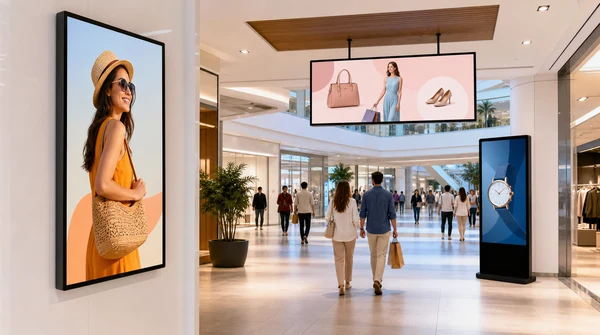
Digital signage projects often begin with a vague request: “We need a screen for advertising.” That sounds simple, but it is not enough to choose the right display. A 32 inch screen near a checkout counter, a 55 inch vertical advertising display in a mall, and a 98 inch lobby screen are built for different jobs.
The right choice depends on where people stand, how far away they are, what content they need to read, how bright the space is, and how often the content changes. This guide is written for retail chains, restaurant buyers, mall operators, signage contractors, distributors, and OEM/ODM buyers who need a practical way to compare digital signage displays before asking for a quotation.

What a digital signage display is used for
A digital signage display is a commercial screen used for advertising, menus, wayfinding, promotions, brand videos, or public notices. It can be wall-mounted, floor-standing, vertical, horizontal, or built into a custom display structure.
A regular TV can play video, but that does not make it the right choice for a commercial signage project. Digital signage buyers usually care about operating hours, public-facing installation, mounting stability, content playback, and whether the same model can be supplied again for future locations. In a real project, the screen has to fit the site as much as it has to fit the budget.
Recommended screen sizes by application
| Application | Common size range | Typical placement | Buyer notes |
|---|---|---|---|
| Checkout counter or shelf display | 18.5 inch to 32 inch | Close viewing distance, counters, shelves, small walls. | Good for price promotions, product videos, QR codes, and compact advertising. |
| Restaurant menu board | 32 inch to 55 inch | Above counter, wall-mounted menu area, ordering zone. | Check readability, layout, mounting height, and whether multiple screens are needed. |
| Retail wall advertising | 43 inch to 65 inch | Store walls, corridors, product display zones. | Works for brand videos, seasonal campaigns, product promotions, and wayfinding. |
| Mall or lobby display | 55 inch to 98 inch | Entrance, lobby, atrium, reception area. | Larger screens are better when the audience views content from several meters away. |
| Outdoor or semi-outdoor signage | Project-based | Storefront, covered entrance, transport area. | Confirm brightness, weather protection, temperature range, and enclosure design. |

Wall-mounted, floor-standing, or custom installation?
The installation method affects more than appearance. It changes the bracket, enclosure, cable route, viewing angle, packaging, and sometimes the whole product structure. A wall-mounted screen is usually the cleanest option for restaurants and stores. A floor-standing kiosk works better in a lobby or mall walkway. Custom structures are common when the display has to match a store fixture or brand design.
| Installation type | Best for | What to confirm |
|---|---|---|
| Wall-mounted digital display | Retail walls, menu boards, corridors, reception areas. | Wall strength, bracket type, cable access, screen orientation, and mounting height. |
| Floor-standing digital signage | Malls, hotel lobbies, showrooms, exhibitions, public entrances. | Base stability, power access, movement route, enclosure design, and packaging size. |
| Vertical advertising display | Fashion retail, shopping centers, elevators, product promotions. | Portrait content layout, brightness, viewing angle, and content update method. |
| Custom signage structure | Brand stores, franchise projects, transport hubs, large commercial spaces. | Mechanical design, ventilation, maintenance access, logo, color, and OEM/ODM details. |
Brightness and operating environment
Brightness is one of the easiest details to get wrong. A screen can look clear in a showroom and look weak near a bright window, a mall entrance, or a glass storefront. Indoor retail screens usually need less brightness than semi-outdoor signage or displays placed under strong light.
Before asking for a price, describe the installation environment. Is the display indoors, near glass, under direct light, or inside a covered outdoor area? Will it run during store hours only, or almost all day? These details affect panel choice, cooling design, enclosure structure, and service life.

Content playback and control options
Some signage projects only need USB playback. Others need network updates, remote scheduling, Android media playback, or a content management system. The right setup depends on how often the content changes and who manages it.
| Content method | Suitable project | Buyer notes |
|---|---|---|
| USB playback | Small stores, simple menu boards, low-frequency updates. | Simple and low cost, but staff must update content manually. |
| Android media player | Retail stores, restaurants, showrooms, and standard signage projects. | Supports common media playback and may support apps depending on configuration. |
| Network content update | Chain stores, malls, advertising networks, multi-location projects. | Useful when content changes often or needs centralized scheduling. |
| Custom CMS or software integration | Large projects, franchise systems, transport hubs, or branded networks. | Confirm software compatibility, language, server setup, and maintenance responsibility. |
What to prepare before requesting a quotation
A clear request helps the supplier recommend the right hardware and avoid repeated revisions. Instead of asking only for “a 55 inch advertising screen,” prepare the project details that affect display configuration, software, packaging, and cost.
- Screen size and quantity.
- Indoor, semi-outdoor, or outdoor use.
- Wall-mounted, floor-standing, vertical, horizontal, or custom installation.
- Viewing distance and content type.
- Brightness requirement or installation lighting conditions.
- Content update method: USB, Android, network, CMS, or custom software.
- OEM/ODM needs such as logo, boot screen, packaging, enclosure color, interface language, or accessories.
- Destination country, plug type, voltage, warranty expectation, and project timeline.
Manufacturer support for digital signage projects
For a single small store, a standard display may be enough. For a chain store, mall project, restaurant group, or distributor order, working with a manufacturer is usually more efficient. The buyer can standardize screen sizes, installation style, system configuration, packaging, and replacement parts across the project.
Huixin supplies advertising digital signage solutions for retail, restaurant, commercial, and project-based display use. Buyers can compare products such as Commercial Digital Signage Displays, 55 Inch Digital Advertising Screen, and Wall Mounted Digital Display. For project requirements, buyers can contact Huixin for a tailored quotation.
FAQ: Digital Signage Screen Size
What size digital signage screen is best for a retail store?
For small retail areas, 32 inch to 43 inch can work well. For wall advertising or product promotion zones, 43 inch to 65 inch is more common. Larger lobbies or mall spaces may need 75 inch, 85 inch, or 98 inch displays.
Is a digital signage display different from a normal TV?
Yes. A commercial digital signage display is usually selected for public installation, longer operating hours, mounting stability, content playback, and project consistency. A normal TV may not be suitable for repeated commercial use.
Should I choose wall-mounted or floor-standing digital signage?
Wall-mounted signage is suitable for stores, restaurants, corridors, and reception areas. Floor-standing signage is better for malls, lobbies, exhibitions, and spaces where the display needs to stand independently.
What brightness do I need for indoor digital signage?
Indoor brightness depends on the lighting conditions. A normal indoor store may need less brightness than a glass-front shop or mall entrance. Buyers should describe the installation location before asking for a quotation.
Can digital signage content be updated remotely?
Yes, if the display is configured with network content update or compatible CMS software. Small projects may only need USB playback, while chain stores and advertising networks usually prefer remote scheduling.
Can Huixin customize digital signage displays?
Yes. Huixin can support OEM/ODM options such as logo, boot screen, packaging, enclosure color, interface language, accessories, and project-specific configuration for qualified bulk orders.
What should buyers prepare before requesting a quote?
Prepare the size, quantity, installation method, indoor or outdoor environment, brightness needs, content update method, destination country, and any OEM/ODM requirements.

Brown Wu contributes manufacturer-side guides on smart TV specifications, commercial display applications and OEM/ODM purchasing. Product availability and test conditions vary by model and project.