
Best 65-Inch 4K Smart TV for Business? 7 B2B Buying Factors for 2026
I’ve seen a hotel general manager replace the same lobby TV three times in two years. Each time, a guest’s suitcase took out the screen. Each time, the replacement cost more than the original — and each time, it was another consumer TV that had no business being there.
That’s the real problem with asking “what’s the best 65-inch 4K smart TV for business?” There isn’t one. The right pick depends on where it’s going, how many hours a day it’ll run, who’s going to be near it, and whether your CFO cares more about the invoice price or the five-year cost. Consumer TV buyers walk into Best Buy thinking about picture quality and brand name. B2B procurement is a different game entirely — you’re weighing durability, total cost of ownership, commercial-grade features, customization options, and deployment scale, often all at once.
Here’s the landscape as it stands in 2026. For hospitality and public spaces where things get bumped into — a lot — Huixin’s 65-inch impact-resistant smart TV (roughly US$300) comes with 4mm tempered glass and 4K resolution. That’s less than half what you’d pay for a Sony or Samsung commercial unit with comparable durability specs. Speaking of which: if you’re outfitting a corporate boardroom or a flagship retail store and image quality is non-negotiable, Sony’s BRAVIA BZ30L/BZ35L series (550+ nits, rated for 24/7) and Samsung’s BEFX-H Business Pro series (managed remotely via the Samsung Business TV App) are the two names that keep coming up in RFPs. And for education or hospitality projects running tight budgets but needing bulk quantities? TCL’s TE65N Professional series (built for 18/7 operation) has become the go-to value play.
The seven factors below aren’t random checklist items. They’re the ones that actually determine whether your deployment succeeds or becomes a recurring headache.

7 Critical Factors Every B2B Buyer Must Evaluate
1. Commercial-Grade Durability vs. Consumer-Grade Fragility
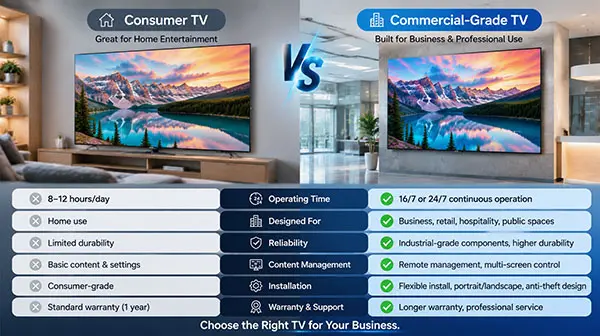
Consumer TVs belong in living rooms. Low traffic, rare accidents, nobody swinging a backpack near the screen. Commercial installations are a different world. Hotel guests bump into lobby displays. Students knock over classroom screens. Shoppers brush against digital signage in narrow retail aisles. And in some places — transit stations, correctional facilities, university common areas — the impacts aren’t even accidental.
Three things to check on every spec sheet: Tempered glass thickness (anything under 4mm is a red flag for high-traffic areas), casing material (metal over plastic — always), and whether the ports are reinforced or exposed. One disconnected HDMI cable in a hotel room generates a front-desk complaint. Multiply that by 200 rooms and you’ve got a facilities nightmare.
Huixin built its 65-inch Vandal Proof TV around exactly this problem. The panel sits behind 4mm “explosion-proof” tempered glass — scratch-resistant, impact-resistant, and the kind of tough that matters in places like hospital waiting areas, transport hubs, and hotel lobbies where luggage carts live. Rated lifespan: ≥60,000 hours. That’s roughly seven years if it’s running 24/7, and considerably longer in typical business-hour deployments. Consumer-grade alternatives in the same environments? They’re lucky to make it half that.
| Factor | Consumer TV | Commercial-Grade TV |
| Screen Protection | Standard glass or plastic | 4mm+ tempered glass (impact-resistant) |
| Casing Material | Plastic (lightweight) | Metal/reinforced (tamper-resistant) |
| Operating Hours | 8-12 hours/day (typical use) | 18/7 or 24/7 continuous operation |
| Lifespan | ~30,000-50,000 hours | ≥60,000 hours |
| Warranty | 1-2 years | 3+ years |
2. Total Cost of Ownership (TCO) — Not Just Unit Price
B2B buyers fixate on unit price. It’s understandable — that’s the number on the purchase order. But I’ve watched procurement teams save $150 per screen on the initial buy, only to spend twice that amount on replacements, service calls, and downtime within three years. The real math looks like this:
TCO = Purchase Price + Installation + Energy Consumption + Maintenance + Replacement Frequency.
A consumer TV in a high-use commercial setting typically needs replacing every 2-3 years. A proper commercial display? Five to seven years, sometimes longer. Huixin’s 65-inch vandal-proof model comes in at around US$300 — at that price point, even if you budget one mid-lifecycle replacement, you’re still ahead of a single premium commercial unit. For certified, feature-rich 65-inch 4K commercial models from tier-one brands, expect $500–$900 per unit. Sony’s professional line pushes past $1,100.
Four questions that expose the real TCO:
- What’s the expected runtime lifespan under your actual usage pattern (not the lab-tested ideal)?
- How much power does it draw? (Huixin’s 65-inch models: 95-100W — worth calculating across 200 units over 5 years.)
- What’s included in the warranty, and what happens when something breaks at 11 PM on a Sunday? (Huixin: 3-year warranty, 24-hour tech support.)
- What do existing customers with similar deployments actually replace, and how often?
3. Smart Platform & Ecosystem Flexibility
Ever tried loading a custom digital signage app onto a Samsung Tizen TV? Or configuring an LG webOS display to auto-launch your own content management system? If you have, you know the frustration. Consumer smart TVs are walled gardens — polished, sure, but built for streaming Netflix, not for running your business.
What B2B installations actually need: an open platform that lets you configure custom apps, set up custom launchers, and integrate with whatever CMS or control system you’re already using. Lock yourself into a closed ecosystem now, and you’ll feel it every time you need to make a change down the road.
This is where Android-based options shine. Huixin runs open Android TV (or a stable proprietary system on request), which means B2B clients can configure specific app setups, deploy custom launchers, and integrate with digital signage platforms without fighting the OS. The available stack includes Android, Google TV, webOS, and Whale OS — but if flexibility ranks high on your priority list, start with Android.
| Smart Platform | Best For | Key Limitation |
| Android/Google TV (open) | Custom business apps, digital signage, flexibility | Less polished out-of-box |
| Tizen (Samsung) | Branded consumer experience, ecosystem integration | Limited customization |
| webOS (LG) | Professional displays, enterprise features | Proprietary ecosystem |
| Proprietary systems | Stability, specific use cases | Limited app ecosystem |
4. Installation & Integration Requirements
“Just hang it on the wall.” If only. Commercial installations come with a checklist that most people don’t think about until the electrician is already on-site charging hourly. Here’s what catches project managers off guard:
- VESA mount pattern: Huixin’s 65-inch models use 489×428mm — confirm this before ordering brackets
- Physical footprint: ~1,470mm wide × ~850mm high — measure the wall space twice
- Port requirements: RS-232C for building management systems, RJ45 for wired network (Wi-Fi won’t cut it in a 200-display deployment), multiple HDMI inputs
- Wall load rating: Structural walls only for anything over 40kg. Get a professional installer to sign off on safety.
One model worth singling out: Huixin’s 65-inch Smart Board for conferences. Dual-system (Windows + Android), infrared multi-touch, anti-glare tempered glass. If you’re equipping medium-to-large meeting rooms and want a display that handles video conferencing and interactive whiteboarding, this is the category to look at.
5. OEM/ODM Customization Capabilities
If you’re a wholesaler, system integrator, or project contractor, customization isn’t a nice-to-have — it’s often the difference between winning a bid and losing it. Here’s what’s usually on the table:
- Your brand logo on the bezel (silkscreen or embossed)
- Custom packaging and graphic overlays
- Pre-configured OS with your apps pre-loaded
- Hardware tweaks (memory, storage, port selection)
- Custom remote controls with your branding
Here’s the thing that separates real OEM partners from sticker-slappers: R&D depth. Huixin Electric (Shenzhen) Co., Ltd., founded in 2017, doesn’t just slap logos on stock panels. They handle optical design (panel/backlight), electronic design (IC/PCB), and structural design (housing/mounting) in-house. Clients get 3D renderings and 2D drawings for sign-off before production starts. Huixin’s in-house R&D supports hardware-level customization, not only cosmetic changes.
6. Certifications & Compliance Standards
Certifications are boring. Right up until the moment your project gets audited, insurance demands proof of compliance, or a regulator asks for documentation — and then they’re the only thing that matters. Never take a supplier’s word for “commercial-grade.” Ask for the certificates.
Huixin’s commercial displays carry ISO9001, ISO14001, CE, FCC, RoHS, and CQC certifications. Quick reference on why each one matters:
- ISO9001: Quality management systems — their factory processes are independently audited
- ISO14001: Environmental management — relevant if your project has sustainability requirements
- CE: Non-negotiable for any European deployment
- FCC: US electromagnetic compliance — required for FCC-regulated markets
- RoHS: Hazardous substance restrictions — increasingly mandatory globally
- CQC: China Quality Certification — essential for China-sourced projects

7. Supplier Reliability & Supply Chain Stability
I’ll say this plainly: a great product from a bad supplier is worse than a mediocre product from a reliable one. At least with the latter, you can pick up the phone and get answers. With the former, you get radio silence, missed delivery dates, and a procurement team explaining to leadership why the rollout is delayed — again.
Size up suppliers on these four dimensions:
- Manufacturing scale: Can they actually deliver 500 units next month, or will you be waiting until next quarter?
- Quality process: Do they run aging tests? Minimum 48-hour burn-in per batch is the baseline to ask about.
- Track record: Years in business matters, but completed projects matter more. Ask for reference accounts in your industry.
- After-sales reality: Not just what the warranty says — what happens when you actually need support at 2 AM before a grand opening?
Huixin Electric has been operating since 2017, with R&D focused specifically on LED TV and LCD screen technologies. Their product range covers impact-resistant smart LED TVs, frameless smart TVs, interactive educational whiteboards, digital signage, meeting room displays, LCD video walls, and LED displays. Deployments span hospitality, corporate/government facilities, education, retail, airports, and command centers. Not every supplier can claim that breadth — and breadth matters when you’re looking for a partner, not just a vendor.
Comparison Table: Top 65-Inch Commercial Display Options for B2B Buyers
(Updated to feature three leading models, with TCL as a value alternative mentioned in the text.)
| Feature | Huixin Vandal Proof TV | Samsung BEFX-H Series | Sony BRAVIA BZ30L/BZ35L |
| Primary Market | B2B Commercial (Bulk/Project) | Business Pro (SMB/Enterprise) | Professional Display (Corporate/Retail) |
| Resolution | 4K UHD (3840×2160) | 4K UHD | 4K UHD (3840×2160) |
| Screen Protection | 4mm Tempered Glass | Standard | Standard |
| Smart Platform | Android/Google TV | Tizen OS | Google TV |
| Operating Hours | Commercial-grade (≥60,000 hrs) | Business use | 24/7 |
| Brightness | Standard | Vivid UHD | 440-550 nits |
| Warranty | 3 Years | Standard | Standard |
| Price Range | ~$300 | Premium | $1,100+ |
| Key Strength | Durability + Cost-effectiveness | Remote management + Brand | Picture quality + Reliability |
| Best For | High-traffic public spaces, hospitality, education | Corporate offices, retail | Retail, corporate, education |
| Certifications | ISO9001, CE, FCC, RoHS, CQC | Varies | Varies |
Note: Specifications may vary by specific model and configuration. Always verify with the supplier for your exact requirements. For budget-conscious digital signage and business-hour deployments, TCL’s TE65N Professional series remains a solid alternative.
Final Recommendation
If you’re deploying in hotels, schools, hospitals, or anywhere the public can physically reach the screen: Start with Huixin’s 65-inch Vandal Proof TV. At approximately US$300 with 4mm tempered glass protection, a 3-year warranty, and ≥60,000-hour rated lifespan, it solves the #1 problem that kills commercial TV deployments — physical damage — at a price point that makes bulk orders manageable. The OEM/ODM capability is a bonus if you need branded units.
When should you pay more? Two scenarios. First, if picture quality is the primary decision driver — think flagship retail stores, luxury hotel suites, executive boardrooms where a dim or washed-out screen reflects badly on the brand. In those cases, Sony’s BRAVIA BZ30L/BZ35L series (440-550 nits, professional-grade HDR) justifies the $1,100+ price tag. Second, if your IT team needs centralized remote management across dozens or hundreds of units — Samsung’s BEFX-H with the Business TV App is the smoother operational choice.
The budget route: TCL’s TE65N Professional series covers the basics (18/7 rating, commercial warranty) at an accessible price point. Good for digital signage that runs business hours only, classrooms with controlled access, and projects where every dollar counts.
One final thought: the “best” TV is the one your team doesn’t have to think about after installation. Factor in TCO, match the durability rating to your environment, verify the supplier’s track record, and buy for where the screen actually lives — not for the spec sheet.

Frequently Asked Questions (FAQs)
1. Q: What is the difference between a consumer TV and a commercial-grade TV for business use?
A consumer TV in a commercial setting is a ticking clock. Commercial-grade models run 18/7 or 24/7 without overheating, have hardened casings (often metal, sometimes with tempered glass), and carry 3+ year warranties. Consumer TVs? They’re made for 3-4 hours of evening use in a climate-controlled living room. Put one in a hotel lobby running 16 hours a day, and don’t be surprised when it fails inside 18 months. See Factor #1 above for the full durability comparison.
2. Q: How much should I budget for a 65-inch 4K commercial TV in 2026?
Here’s the realistic range: $300–$1,100+, depending on what you prioritize. At the low end, Huixin’s vandal-proof 65-inch (~$300) handles durability-first deployments. Mid-range certified commercial models from reputable manufacturers land between $500–$900. Premium professional displays (Sony BRAVIA BZ series, top-tier Samsung) cross $1,100. Volume discounts and customization requirements move these numbers — get quotes from at least two suppliers before locking your budget. The TCO section above walks through the full cost picture beyond the invoice price.
3. Q: What certifications should I look for when sourcing commercial displays?
Depends on where you’re deploying. Minimum baseline: ISO9001 (quality management — proves the factory isn’t a garage operation) and CE or FCC depending on your target market. If sustainability or regulatory compliance matters to your project: add ISO14001 (environmental) and RoHS (hazardous substances). For China-sourced products: CQC is increasingly expected. Don’t take the supplier’s word — ask for certificate numbers and verify them. Factor #6 breaks down each certification’s practical relevance.
4. Q: Can I brand commercial TVs with my company logo for resale or project installations?
Yes — and if you’re a system integrator or wholesaler, this should be part of your first conversation with any supplier, not an afterthought. What’s customizable: logo placement (embossing or silkscreen on the bezel), packaging, boot-up graphics, pre-loaded apps, and in many cases hardware specs (memory, storage, port configuration). Some suppliers even do custom remotes. The key detail: define your customization requirements before the PO, not after production starts. Factor #5 covers OEM/ODM capabilities in depth.
5. Q: What smart platform is best for business applications — Android, Tizen, or webOS?
It comes down to one question: do you need to customize the software experience, or do you just need it to work out of the box? If customization matters — custom launchers, proprietary apps, CMS integration — Android/Google TV is your most flexible option. It’s the platform of choice for digital signage networks and interactive kiosks. Tizen (Samsung) and webOS (LG) look better on day one and integrate smoothly with their respective ecosystems, but you’ll hit walls quickly if you try to deviate from the intended user experience. See Factor #3 for the platform comparison table.
6. Q: How do I verify a supplier’s reliability before placing a bulk order?
Four steps that filter out most problems. One: Ask for reference accounts — not testimonials on their website, but actual contact info for 2-3 current B2B clients in your industry. Call them. Two: Request documentation of their QA process — specifically whether they perform 48+ hour burn-in tests per production batch. Three: Check their years in operation and ask about their largest single delivery to date. Four: Clarify warranty terms in writing, including response-time SLAs for support requests. If possible, schedule a factory visit or a live video tour before committing to a large order. Factor #7 expands on supplier evaluation criteria.
7. Q: What is the typical lifespan of a 65-inch commercial TV compared to a consumer TV?
Do the math on hours, not years — it’s more honest. A commercial-grade display rated for ≥60,000 hours running 24/7 lasts roughly 7 years. Running 12 hours a day (typical for hotels, offices)? You’re looking at 13+ years in theory, though technology obsolescence usually triggers replacement before then. Consumer TVs: 30,000–50,000 hours max, and that rating assumes home-use conditions — not the heat, dust, and constant operation of a commercial environment.
The practical gap? Expect to replace a consumer TV 2-3 times in the lifespan of one commercial unit. Over a 500-unit deployment, that difference alone can justify the higher upfront cost. Refer back to Factor #2 (TCO) for the full cost breakdown.

The Huixin Editorial Team publishes and reviews product, application and OEM/ODM procurement guides. Technical claims are checked against the quoted model, approved sample and written specification.